Determining the licensing status of the Windows operating system on a computer is an important step that every user should take. Whether you’re an individual or a business, verifying whether your Windows is genuine or pirated not only ensures stable performance but also protects your system from serious security risks and helps you comply with legal regulations. This article will guide you on how to accurately and easily check whether your Windows is licensed or pirated, while also clarifying the associated benefits and risks.
Why is it so important to check your Windows license?
Before installing, upgrading, or continuing to use the operating system, it is essential to proactively verify your Windows license to determine whether the system you are running is a validly licensed version from Microsoft. This not only affects the user experience but also directly impacts security, performance, and potential legal issues.
Security and Malware Risks from Cracked Windows
One of the top reasons to avoid cracked versions of Windows is the extremely high security risk. Illegal activation tools (keygens, KMS activators) are often exploited by cybercriminals to spread information-stealing malware such as RedLine, Lumma, ACR, Vidar, and StealC.
This malware is capable of stealing browser passwords, session cookies, bank account data, cryptocurrency wallets, emails, business documents, and even laying the groundwork for large-scale ransomware attacks. A notable malware distribution campaign was detected via the KMSAuto pirated activation tool, infecting more than 2.8 million devices worldwide from April 2020 to January 2023, resulting in over $1.2 million in cryptocurrency losses.
To function, cracking tools typically require users to disable or bypass core Windows security features such as Windows Defender, Tamper Protection, Windows Update, and User Account Control (UAC). Disabling these layers of protection makes the system extremely vulnerable to attacks, allowing malware to infiltrate and operate undetected.
In Vietnam, the cyberattack situation has also become increasingly complex. Security firm Kaspersky reported that the number of spyware attacks targeting organizations in Vietnam surged by 78.8% in 2025, reaching a record high of 191,976 incidents, averaging more than 1,520 spyware incidents per day. This underscores the importance of using genuine software to protect data.
Performance, Stability, and System Updates
Genuine Windows is designed to run stably and optimally. When using a cracked version, users may encounter unexpected system errors, software conflicts, or instability after updates. This directly affects their daily work and entertainment experiences.
More importantly, a genuine copy of Windows ensures that you receive all security updates, bug fixes, and new features from Microsoft in a timely manner. Cracked versions may not receive these updates or may lose their activation after an update, leaving the system outdated and vulnerable to known security vulnerabilities.
Microsoft’s decision to discontinue support for older versions of Windows also poses a significant risk. For example, extended support for Windows 7 ended on January 14, 2020, and for Windows 8.1 on January 10, 2023. In the near future, Windows 10 will also reach the end of its official support on October 14, 2025. After these dates, these versions of Windows will no longer receive free security updates, significantly increasing the risk of cyberattacks, particularly ransomware (over 90% ransomware attacks target unsupported computers). Microsoft recommends that users upgrade to Windows 11 to ensure security.
Legal Compliance and Consequences
The use of unlicensed software, particularly in a business environment, can lead to serious legal consequences. Current Vietnamese law contains clear provisions regarding software copyright.
- For individuals using it for personal purposes: Current law does not address the issue of criminal liability. However, users still face the security and performance risks mentioned above.
- For businesses or organizations that use or sell pirated software: Offenders may face heavy administrative fines, be required to remove pirated software, have their equipment confiscated, and have their business operations suspended for 6 months to 2 years. A landmark criminal case in Vietnam in July 2026 saw five defendants indicted for selling tens of thousands of computers pre-installed with pirated versions of Windows and Office, highlighting the severity of this issue.
The cost of repairing the system and recovering data after a security incident caused by cracked software can be hundreds of times higher than the cost of purchasing a genuine software license. Investing in a genuine Windows license is a small expense compared to the potential losses in terms of data, reputation, and finances.

Checking your Windows license is an important step to ensure security and legal compliance.
Accurate and Simple Methods for Checking Whether Windows Is Genuine or Cracked
To determine the licensing status of the Windows operating system, users can use several simple and effective methods. Below are the three most common methods, which do not require the installation of any additional software.
Check the activation status in Settings
This is the simplest and most intuitive method, suitable for most Windows 10 and Windows 11 users.
Step 1: Open the Settings app on your computer.
Press the button Start (Windows icon) on the taskbar, then select the icon Settings (gear image).
Step 2: Go to the "Activation" section.
- With Windows 11: Select System From the menu on the left, then select Activation.
- With Windows 10: Select Updates & Security, then select Activation from the menu on the left.
Step 3: View the information under "Activation State.".
Here, you'll see the current Windows licensing status:
- Windows is activated: The operating system has been validly activated.
- Windows is activated with a digital license: Your copy of Windows is activated using a digital license, a modern activation method that does not require a physical product key.
- Windows is activated with a digital license linked to your Microsoft account: The digital license has been linked to your Microsoft account, making it easy to reactivate Windows after a hardware change or an operating system reinstallation.
- Windows is not activated: Windows is not activated or has a licensing issue. In this state, you will typically see a watermark that says “Activate Windows” on the screen, and you will be restricted from making certain personalization changes (such as changing the wallpaper or theme).
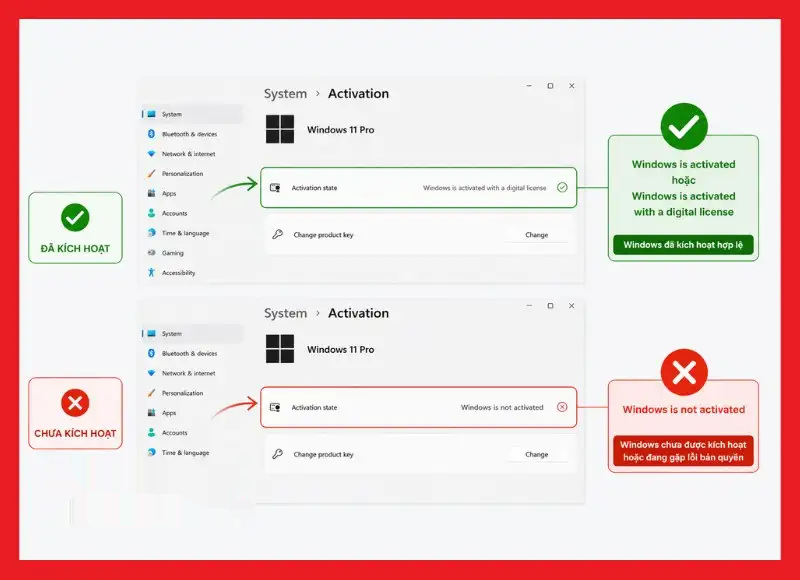
Check the activation status directly in Windows Settings.
Use Command Prompt (CMD) to verify
This method provides more detailed information about the status and type of Windows license and is commonly used by technicians.
Step 1: Open Command Prompt with administrator privileges.
Press the key combination Windows + R To open the Run dialog box, type cmd and press Ctrl + Shift + Enter To run Command Prompt with administrator privileges (or search for “cmd” in the Start Menu, right-click it, and select “Run as administrator”).
Step 2: Enter the license verification command.
In the CMD window, enter the following command and press Enter:
slmgr /xpr
This command will display a dialog box showing the activation status of Windows.
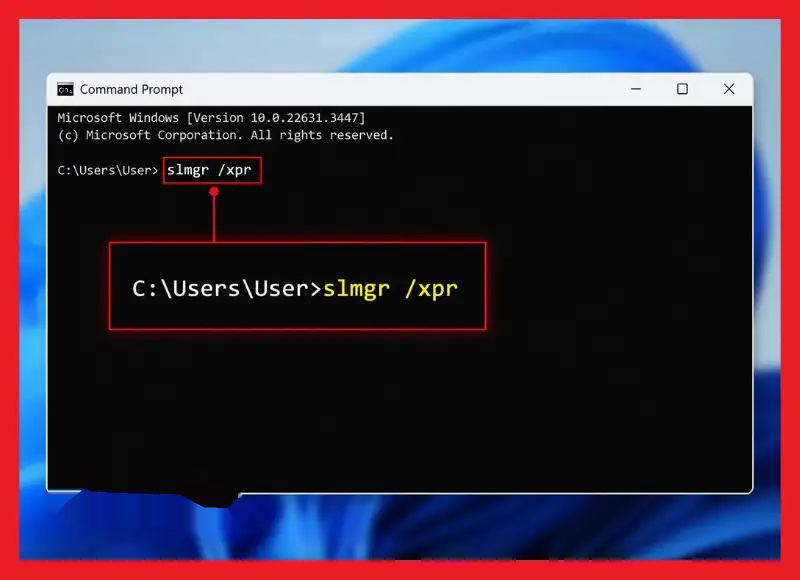
Run the slmgr /xpr command to check the Windows activation status.
Step 3: View the results.
- The machine is always on: Your copy of Windows is permanently activated and valid.
- Windows is in Notification mode: Windows is not validly activated. This status indicates that Windows has not been validly activated. In this state, users will typically see a watermark that says “Activate Windows” on the screen and will be restricted from making certain personalization changes (such as changing the wallpaper or theme).
- If other error messages appear, the system may be using a cracked version or an invalid activation key.
To view more detailed information about the license, you can use the slmgr /dli or slmgr /dlv commands. These commands will display the license type (OEM, Retail, Volume), part of the product key, and the expiration date (if applicable).
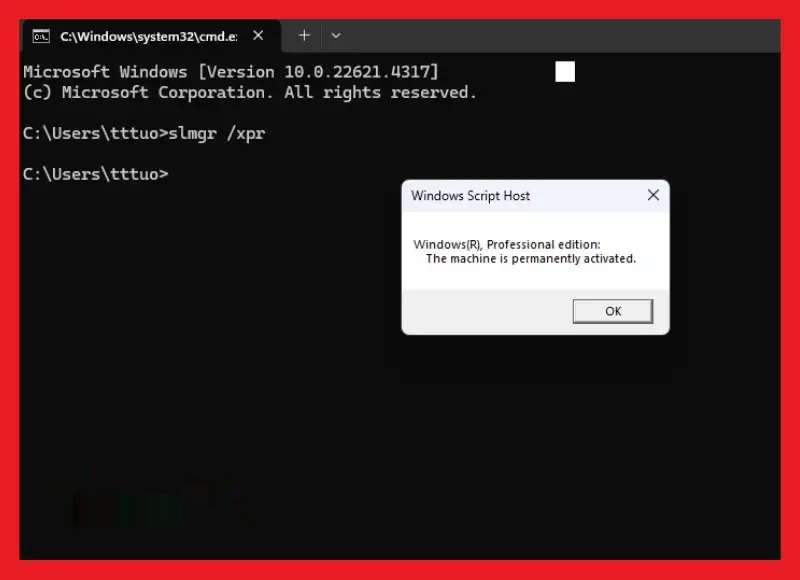
Using CMD provides detailed information about Windows licensing.
Check system information through the Control Panel or This PC Properties
This method is a traditional one that is familiar from many older versions of Windows but still works on Windows 10/11.
Step 1: Open the System window.
You can do this in one of the following two ways:
- Right-click the icon This PC (or My Computer) on the desktop or in File Explorer, then select Properties.
- Or, visit Control Panel, then select System (Make sure the view mode is set to “Large icons” or “Small icons” for easier searching.).
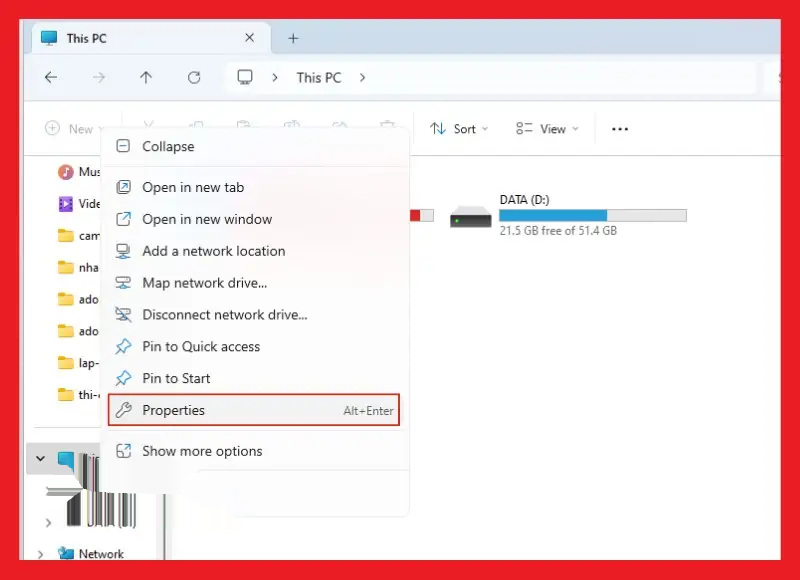
Open the System section to check your Windows information.
Step 2: Check the Windows Activation status.
In the System window, scroll down to the section Windows Activation. If you see the text Windows is activated, which means your operating system is activated.
How to Tell the Difference Between Genuine Windows and Cracked Windows
In addition to using system tools to check, users can also determine whether Windows is genuine or pirated by looking for certain visual indicators and system behavior. This helps you gain a more comprehensive understanding of the operating system’s validity status.
- The “Windows is activated” status is clear: A genuine Windows system will display a valid activation status and complete information in the Activation (Settings) or System (Control Panel) section.
- Receive complete and consistent updates from Microsoft: Computers running genuine Windows will continuously receive the latest security patches, feature updates, and drivers without encountering unexpected activation errors after each update.
- There is no “Activate Windows” watermark on the screen: This is a very clear sign. If a message prompting you to activate Windows continuously appears in the lower-right corner of the screen, that is a common indication that Windows is not properly licensed.
- Full personalization: Genuine Windows allows users to customize every aspect of the interface, from wallpapers, themes, and colors to the lock screen. Cracked or unactivated versions are often limited in their ability to change these Personalization settings.
- No unfamiliar activation tools or third-party KMS software appear: If you find that your computer has software such as KMSAuto, KMSpico, or other activation tools of unknown origin installed, it is highly likely that the operating system you are using is a cracked version. Although KMS (Key Management Service) is a legitimate activation method for large enterprises to manage multiple licenses, the use of third-party “KMS activators” on personal computers is a sign of pirated software.
- Activation error message after a period of use or an update: Cracked versions of Windows often have an unstable activation period. After a certain amount of time, or after the system receives major updates, Windows may become deactivated, display error messages, or switch to license warning mode.
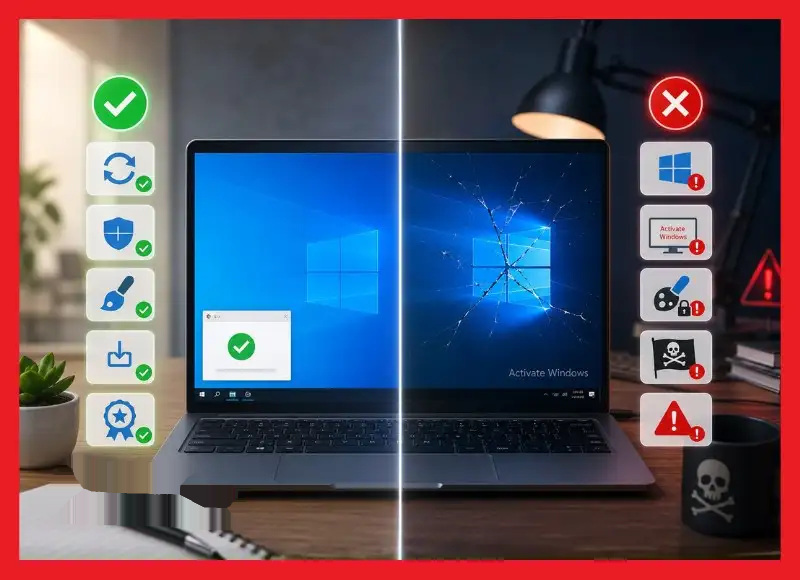
Recognizing these signs early can help users avoid risks associated with using unlicensed versions of Windows.
What should you do if you discover that Windows is not activated or is a cracked version?
If, after checking, you find that the Windows operating system on your computer has not been properly activated or is using a cracked version, it is important to take action promptly to ensure security, stability, and legal compliance. Switching to a genuine, licensed version of Windows offers many long-term benefits.
Common Types of Windows Licenses and How They Work
To better understand Windows licensing, you need to be familiar with the different types of licenses:
- OEM (Original Equipment Manufacturer): This is the type of license that comes with new computers purchased from manufacturers such as Dell, HP, and Lenovo. An OEM license is tied to the first motherboard on which it is activated and generally cannot be transferred to another computer. Technical support for Windows OEM is typically provided by the PC manufacturer.
- Retail (Full Packaged Product – FPP): A retail license is the type you can purchase individually at stores or online. The advantage of a retail license is that it is transferable. You can uninstall Windows from one computer and install and activate it on another (it can only be used on one computer at a time). Retail users receive direct support from Microsoft.
- Volume License (MAK/KMS): This type of license is intended for large businesses and organizations to deploy across multiple computers. There are two main types:
- Multiple Activation Key (MAK): It is a single product key that can activate a fixed number of computers.
- Key Management Service (KMS): Use an internal activation server within the organization’s network to activate Windows computers. Pirated “KMS activator” tools often exploit this mechanism to activate Windows without authorization.
- Digital License: This is the most modern and widely used activation method today. The digital license is tied to the device’s hardware and is stored on Microsoft’s servers. If you link your digital license to your Microsoft account, you can easily reactivate Windows after changing critical hardware (such as replacing the motherboard) using the Activation Troubleshooter.
What should I do to switch to a genuine copy of Windows?
If you are using a cracked version of Windows or have not activated it, follow these steps:
- Check the activation status again: Access Settings > System > Activation (or Updates & Security > Activation (on Windows 10) to check your current license status.
- Activate with a genuine product key: If you already have a valid Windows product key (25 characters), select “Change product key” under Activation, enter the key, and follow Microsoft’s instructions to activate it.
- Link your digital license to your Microsoft account: If you're using a Digital License, make sure it's linked to your Microsoft account. This makes it easy to reactivate Windows in case of a problem or hardware change.
- Remove activation tools from unknown sources: If your computer has any cracked software or third-party KMS tools installed, uninstall them immediately. These tools not only cause system errors but also pose serious security risks.
- Prioritize using genuine, licensed versions of Windows: This is the best way to ensure that your devices receive all security updates, operate reliably, and comply with software licensing regulations.
Where to Buy Genuine Windows and Things to Keep in Mind
To ensure you purchase a genuine, licensed copy of Windows, you should turn to reliable sources:
- Microsoft Store: Buying directly from Microsoft's official website is the safest and most reliable way.
- Authorized partners and reputable retailers in Vietnam: Major retail chains and reputable technology companies such as FPT Shop, Tech360 Vietnam, Pacisoft, Xuân Vinh Computer, and CellphoneS are reliable places to shop.
Important Note: Be cautious of “cheap product keys” widely advertised online from unofficial sources. These keys may be pirated, used, or generated through illegal methods and could be revoked by Microsoft at any time, causing your Windows installation to become unactivated.
Using genuine Windows is always the safest and most reliable long-term choice for both individuals and businesses.
Frequently Asked Questions About Windows Genuine Advantage Validation
How can I tell if my Windows installation is an OEM, Retail, or Volume License version?
You can check the Windows license type by opening Command Prompt (with administrator privileges) and entering the command slmgr /dli or slmgr /dlv. The results will display detailed information about the license type. If you see “OEM Channel,” that indicates a license that came with the computer from the manufacturer. “Retail Channel” indicates a retail license. “Volume_MAK” or “Volume_KMS” indicates a volume license for businesses.
Does a cracked version of Windows receive security updates?
Cracked versions of Windows may receive some basic updates, but they are not guaranteed to be as stable or complete as genuine Windows. In many cases, after a system update, the activation tool may become invalid, causing Windows to display a licensing error or request reactivation. More importantly, the most critical security updates are often skipped or cause conflicts, leaving the system vulnerable to attacks through vulnerabilities that have already been patched in the licensed version.
Do you need third-party software to check Windows activation?
This is usually unnecessary. Users can easily check their Windows license directly using tools available within the operating system, such as Settings, Command Prompt (commands: slmgr /xpr, /dli, /dlv), or through the System window in Control Panel or This PC Properties. Avoiding the use of third-party tools from unknown sources also helps prevent the risk of accidentally installing malware.
What are the risks of continuing to use Windows after support has expired?
When a version of Windows reaches its end of life (EoL), Microsoft will stop providing free security updates. This makes the system extremely vulnerable to attacks exploiting newly discovered security vulnerabilities. Computers can become targets of viruses, ransomware, and other forms of cyberattacks, leading to data loss and the leakage of personal or business information. Microsoft recommends upgrading to a newer version of Windows to ensure security.
"What does "Windows is in Notification mode" mean?
The “Windows is in Notification mode” status appears when Windows has not been properly activated. This means the operating system is running but does not have an official license. In this mode, users will typically see a watermark that says “Activate Windows” on the desktop and will be restricted from using certain personalization features, such as changing the wallpaper, theme, or certain other display settings.